
Published on Oct 19, 2026

Prasanta R
How Are AI Tools Changing the Way Creators Make Images and Videos
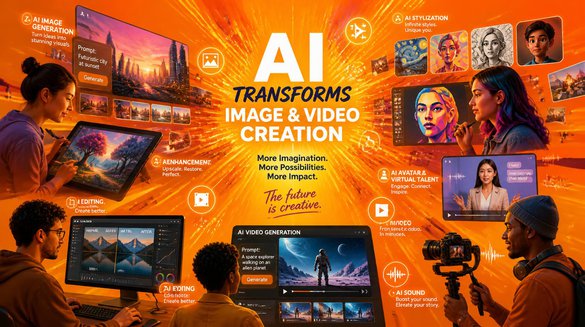
Artificial intelligence is changing how creators plan, design, and produce digital content. Tasks that once required advanced editing skills, expensive software, and hours of manual work can now be completed with AI-powered creative tools. From generating realistic images to producing cinematic video clips, these technologies are opening new possibilities for marketers, designers, content creators, and small businesses.
But how can creators choose the right AI tools, and what role do newer models play in modern content production?
How Does AI Make Image and Video Creation Easier?
AI creative tools help transform written prompts, reference images, and existing visual assets into new content. Instead of starting with a blank canvas, users can describe an idea and explore different visual directions before deciding which result best fits their project.
For example, a marketer can generate product concepts for an advertising campaign, while a social media creator can develop illustrations, thumbnails, or short video scenes. These workflows can reduce repetitive tasks and make experimentation more accessible to people without professional design experience.
The quality of the result still depends on the prompt, reference material, model capabilities, and any editing required afterward.
What Should You Know About New AI Image Generation Models?
AI image generation has become useful for a wide range of creative tasks, including realistic photography, digital artwork, promotional graphics, and concept development. Different models may offer different strengths in visual style, prompt interpretation, text rendering, and editing flexibility.
Ideogram 4.5 is a model name that creators may explore when researching newer AI image-generation options. When evaluating any image model, it is worth testing how accurately it follows detailed prompts, handles typography, maintains visual consistency, and produces images suitable for a specific project.
For example, someone designing a promotional poster may prioritize readable text and layout, while a digital artist may care more about lighting, composition, and stylistic detail. Comparing outputs against the actual project requirements is more useful than choosing a tool based on popularity alone.
How Is AI Video Generation Evolving?
AI video generation allows creators to turn text descriptions and still images into moving scenes. These capabilities can help with storyboarding, social media videos, product demonstrations, short advertisements, and early-stage film concepts.
Kling 4.0 is an example of the newer generation of AI video models focused on greater creative control and more coherent storytelling. Its announced capabilities include text-to-video and image-to-video generation, multiple keyframes, reference-based control, and video generation of up to 30 seconds in a single generation. Availability and individual features may depend on the rollout and access level.
These types of features can help creators plan scene transitions, guide character movement, and develop longer visual sequences. However, generated footage may still require review and editing to correct inconsistencies or achieve the intended result.
Can Creators Combine AI Image and Video Workflows?
Combining image and video generation can make a creative workflow more flexible. A creator might begin by developing a character or product concept as a still image, refine the visual style, and then use image-to-video generation to animate the concept.
A typical workflow could include:
- Develop the concept: Write a clear description of the subject, setting, mood, and visual style.
- Generate the image: Explore different compositions and select a suitable starting frame.
- Plan the motion: Describe the movement, camera angle, pacing, and scene changes.
- Generate the video: Use a suitable AI video model to animate the image or create a scene from a text prompt.
- Review and refine: Check visual consistency, timing, details, and overall quality before publishing.
This approach can be particularly useful for product campaigns, explainer content, short-form storytelling, and social media creatives.
How Can You Choose the Right AI Creative Tool?
The best tool depends on what you need to create rather than which model has the newest version number. Before choosing a platform, consider the following factors:
- Output quality: Does it produce visuals that match your intended style?
- Prompt accuracy: Can it follow detailed instructions reliably?
- Creative control: Can you guide composition, character appearance, movement, and scene structure?
- Editing options: Can you refine the result without restarting the entire process?
- Cost and access: Are the available plans, generation limits, and export options suitable for your workflow?
Testing a few representative prompts is often the most practical way to compare tools. Use the same creative brief wherever possible so that differences in output are easier to assess.
What Is the Future of AI-Powered Content Creation?
AI is making visual production more accessible, but creative judgment remains important. Models can generate initial concepts and help speed up production, while human creators provide direction, evaluate quality, and ensure that the final content communicates the intended message.
As image and video models continue to evolve, the most effective workflows will likely combine automated generation with thoughtful planning, editing, and review. Understanding each tool's strengths can help creators produce more relevant content without sacrificing their creative vision.

Safeguard Your Child Against Online Threat
Register Now Cancel Any Time
Available
on
Cancel Any Time
Available
on