
Published on Sep 18, 2026

Super Admin
App Blocker iPhone: 5 Best Apps to Reduce Distractions
We tested 10+ app blockers for the iPhone to find out which ones actually help you take back control of your time—not just lock a few apps. Here are the best solutions to help you spend less time distracted and more time focused:
🎯 Floviu → Best App Blocker for iPhone for Building Better Focus Habits
🚫 Opal → Best App Blocker for iPhone for Customizable Distraction Blocking
🧘 ScreenZen → Best App Blocker for iPhone for Mindful Screen-Time Control
🧠 one sec → Best App Blocker for iPhone for Breaking Distracting Habits
💻 Freedom → Best App Blocker for iPhone for Cross-Device Distraction Blocking
Quick Comparison of the Best App Blockers for iPhone
If you’re not sure which app blocker for iPhone to choose, this quick comparison highlights what each app does best. Some focus on strict blocking, while others use app limits, interventions, or broader focus tools to help you manage distractions.
| Tool | Best for | Standout feature | Price |
|---|---|---|---|
| Floviu |
Best focus app for building better focus habits |
Focus insights and sessions | Free / From $9.99/mo |
| Opal | Customizable distraction blocking | Deep Focus and flexible Rules | Free / From $8.29/mo |
| ScreenZen | Reducing mindless scrolling | Delays, limits, and strict blocking | Free |
| one sec | Breaking automatic app-opening habits | Mindful interventions | Free / From €3.99/mo |
| Freedom | Cross-device distraction blocking | Synced blocking sessions | Free / From $3.33/mo |
A Closer Look at Each iPhone App Blocker
Floviu
Best App Blocker for iPhone for Building Better Focus Habits
Floviu takes a broader approach to focus than a traditional app blocker. It blocks distracting apps when you need to focus, but it’s also a focus app for work that helps you understand when, where, and how you focus best.
It combines focus sessions, distraction protection, personalized insights, and visual progress in one complete focus system.
Best for:
People who want to reduce distractions while understanding and improving their focus habits
Not ideal if:
You only want a simple app blocker with strict restrictions
Biggest advantage:
Combines distraction protection with focus sessions, focus insights, and long-term progress
Main tradeoff:
Its broader focus system may be more than you need if your only goal is blocking distracting apps
How Floviu’s Features Performed During My Testing
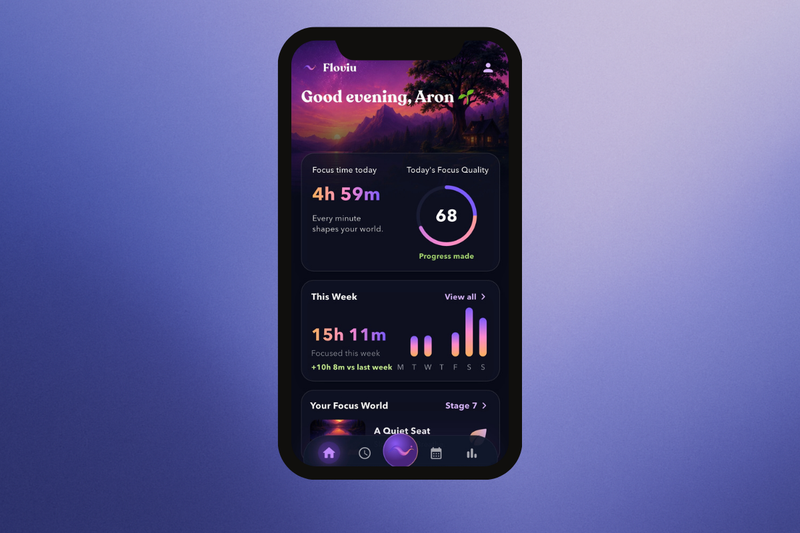
Distraction Protection: Floviu includes distraction protection to help you create a more focused environment during your sessions. Rather than positioning app blocking as the entire solution, Floviu treats it as one part of a broader approach to managing your attention.
Focus Timer: Floviu combines distraction protection with dedicated focus sessions, including Pomodoro-style Focus Sprints and longer uninterrupted sessions. You can also organize sessions with tags and use Quick Capture to save distracting thoughts without leaving your session.
AI Focus Insights: This is where Floviu goes beyond a typical app blocker. After using it across multiple focus sessions, its Focus Insights helped me look beyond the amount of time I spent working and understand patterns in my focus habits. It provides insights around focus hours, session length, and distractions, as well as the personal Focus Formula and weekly and monthly observations.
Focus Soundscapes: Floviu also includes built-in soundscapes that can create a more consistent environment for concentration. I liked having them available within the same app, especially when I wanted some background sound without opening another app during a focus session.
Focus World: Every completed focus session contributes to your virtual Focus World, giving you a visual representation of your progress. It is a small motivational feature, but I liked that it makes consistent focus feel more tangible over time.
Floviu Pricing
● Free plan available
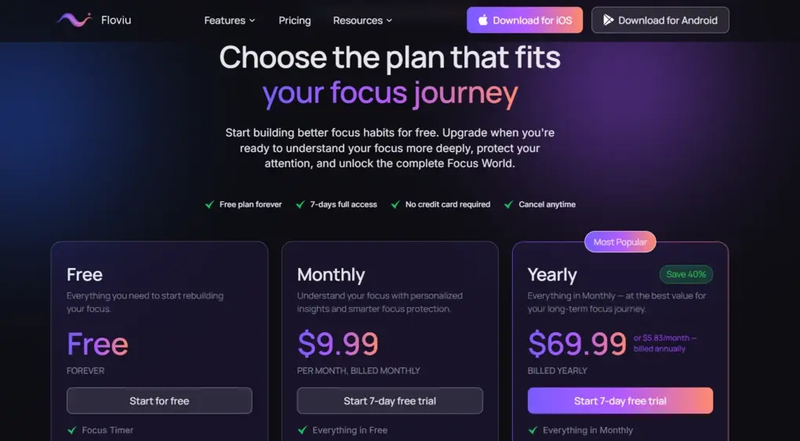
● Monthly plan: $9.99/user
● Yearly plan: $69.99/user
● 7-day trial available with no credit card required
Floviu’s Strengths
● Goes beyond basic app blocking with a complete focus system
● Focus sessions support both Pomodoro-style and longer deep work
● Focus Insights help you understand your personal distraction patterns
● Focus World makes long-term progress visible
● Combines distraction protection with attention-management tools
● Calm interface and soundscapes create a supportive environment for focused work
Short wrap-up: Floviu is a strong choice if blocking distracting apps is only part of what you need. Its focus sessions, personalized insights, and visual progress make it better suited to people who want to understand their attention and build more sustainable focus habits over time.
Floviu’s Limitations
● May feel too feature-rich if you only want a basic app blocker
● Its broader value comes from using several focus and attention-management features together
● Users looking for the strictest possible app restrictions may prefer a dedicated blocking app
Short wrap-up: If you simply want to block a few distracting apps and forget about them, Floviu may offer more than you need. But if distraction is a symptom of a broader focus problem, its more comprehensive approach makes it a better fit.
Opal
Best App Blocker for iPhone for Customizable Distraction Blocking
Opal is a focus and screen-time app that puts strong emphasis on controlling access to distracting apps and websites. It gives you detailed control over when distractions are blocked, with customizable sessions, schedules, and blocking levels that make it easier to create clear boundaries around your phone use.
Best for:
Blocking distracting apps and reducing screen time
Not ideal if:
You want an app focused more on understanding your personal focus patterns than restricting distractions
Biggest advantage:
Extensive control over which apps and websites are blocked and when
Main tradeoff:
Its stronger blocking approach can feel restrictive compared with apps that take a more flexible approach to distraction management
How Opal’s Features Performed During My Testing
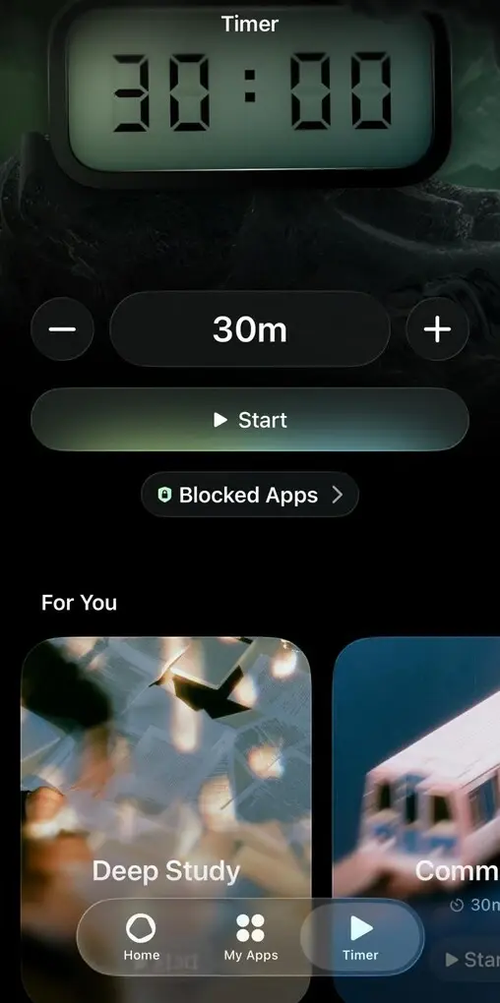
Focus Sessions: Opal lets you start a Focus Session for a set amount of time and choose which apps and websites you want to block. I found this useful when I wanted to create a clear boundary around a work or study session instead of relying on willpower alone.
App Blocking: Opal gives you plenty of control over how blocking works, including blocklists, allowlists, schedules, and different levels of blocking difficulty. This makes it easy to build a setup around the apps that are most likely to interrupt your focus.
Deep Focus: When you need stronger protection from distractions, Deep Focus provides Opal’s strictest blocking level. It prevents you from simply cancelling or bypassing the session, which can be useful when you know you are likely to give in to distractions.
Focus Score and Insights: Opal tracks screen-time and focus-related data through features such as Focus Score, Focus Reports, and Opal Score. I found these useful for getting a quick overview of how I spend time on my phone, although Opal is more focused on tracking screen-time behavior than explaining the deeper reasons behind distractions.
Rewards and Milestones: Opal also adds a light gamification element through milestones and rewards for staying focused. I liked this as an extra motivational feature, particularly if seeing your progress makes it easier to maintain a focus routine.
Opal Pricing
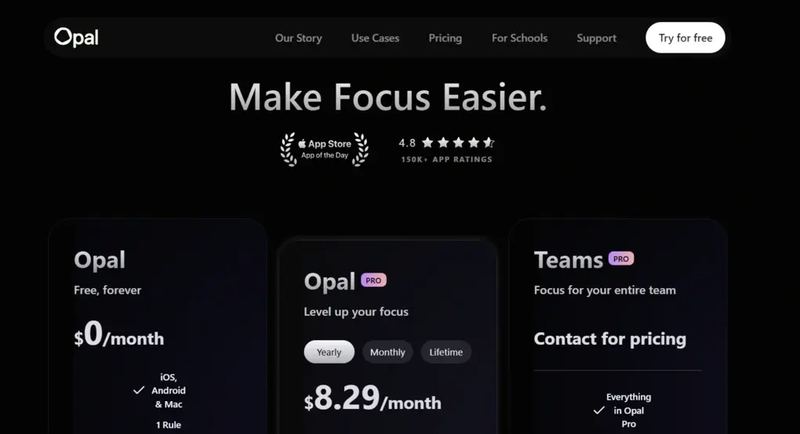
● Free plan available, as well as a 7-day free trial
● Opal Pro plan: $8.29/month with annual billing
● Teams Pro plan: Custom pricing
Opal’s Strengths
● Powerful app and website blocking
● Highly customizable Rules and schedules
● Deep Focus provides strong protection against distractions
● Detailed screen-time and focus tracking
● Integrates with iPhone Focus Mode and Shortcuts
● Rewards and milestones add a motivational element
Short wrap-up: Opal is a strong choice for people who know which apps distract them and want detailed control over when and how those distractions are blocked.
Opal’s Limitations
● Strong blocking can feel restrictive
● Less focused on understanding the personal causes and patterns behind distraction
● Screen-time tracking is more focused on phone habits than deep-work performance
Short wrap-up: If you want strong, customizable restrictions around distracting apps, Opal is one of the more comprehensive options. However, users looking to understand and improve the underlying habits behind their distractions may benefit more from a complete focus app such as Floviu.
ScreenZen
Best App Blocker for iPhone for Mindful Screen-Time Control
ScreenZen takes a more flexible approach to app blocking by giving you several ways to interrupt distracting habits. Instead of relying only on strict blocks, it can add delays before an app opens, limit how long you can use it, interrupt scrolling, or block access completely when you need stronger boundaries.
Best for:
Reducing mindless scrolling without completely locking yourself out of distracting apps
Not ideal if:
You want a more comprehensive focus system with deep-work sessions and detailed focus insights
Biggest advantage:
Offers multiple ways to manage distracting apps, from short delays to strict blocking
Main tradeoff:
Its focus is primarily on screen-time control rather than broader focus management
How ScreenZen’s Features Work
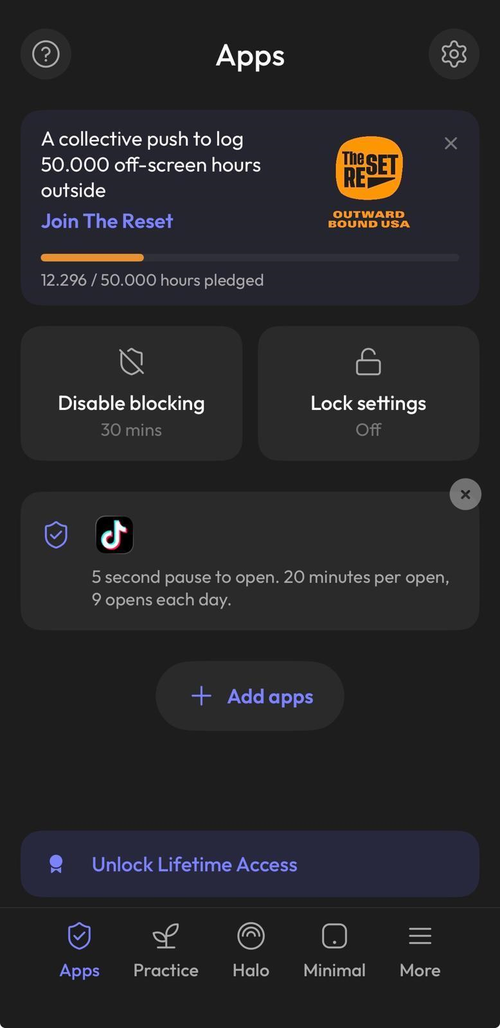
Opening Delays: ScreenZen can add a waiting period before a distracting app opens, giving you a moment to decide whether you actually want to use it. The delay can also increase each time you open the app, adding more friction when you repeatedly return to the same distraction.
Scrolling Interruptions: Rather than blocking an app completely, ScreenZen can let you check it for short periods before interrupting your session. This is useful if you still need access to social media or other distracting apps but want to prevent a quick check from turning into a long scrolling session.
App Goals and Limits: You can set goals for individual distracting apps and optionally have ScreenZen block them once you reach your limit. The app also lets you configure different limits and schedules depending on the day and time.
Strict Blocking: When softer limits aren't enough, ScreenZen can block apps completely for specific time ranges, after a certain number of opens, or based on your Screen Time usage. It also has a settings lock designed to make it harder to change your restrictions when you're tempted to bypass them.
Mindful Prompts and Activities: ScreenZen can show prompts such as asking whether opening an app is important, while breathing exercises and other activities can give you something else to do during the waiting period. These features make the app more about interrupting automatic behavior than simply taking an app away.
Screen-Time Tracking and Streaks: ScreenZen focuses its tracking specifically on distracting apps, so essential apps such as Maps don't inflate the numbers. Streaks also provide a simple way to see whether you're staying within your limits or avoiding overrides.
ScreenZen Pricing
● ScreenZen's core app is completely free and supported by donations
ScreenZen’s Strengths
● Completely free for its core app-blocking features
● Multiple approaches to reducing screen time
● Delays create friction without always requiring a full block
● Flexible schedules and app-specific limits
● Strict blocking is available when stronger restrictions are needed
● Settings locks make restrictions harder to bypass
● Focuses specifically on distracting-app usage rather than overall screen time
Short wrap-up: ScreenZen is a great choice if you want to reduce mindless scrolling while keeping some flexibility around how you use distracting apps. Its combination of delays, limits, prompts, and strict blocking makes it more adaptable than a basic app blocker.
ScreenZen’s Limitations
● Less focused on structured deep-work sessions
● Doesn't offer the broader focus insights and long-term focus system
● Its many blocking options may require some setup to find the approach that works best for you
● Users who want completely strict restrictions may prefer an app built primarily around hard blocking
Short wrap-up: ScreenZen works best for people who want to change how they interact with distracting apps rather than simply block them outright. If your goal is to build deeper focus habits alongside distraction protection, a more comprehensive focus app may be a better fit.
one sec
Best App Blocker for iPhone for Breaking Distracting Habits
one sec adds a short pause before opening distracting apps, helping you interrupt automatic scrolling and become more intentional with your screen time.
Best for:
Breaking automatic scrolling habits and using distracting apps more intentionally
Not ideal if:
You want a traditional focus timer or detailed productivity analytics
Biggest advantage:
Its friction-based interventions help you pause before opening distracting apps
Main tradeoff:
Its approach focuses more on changing screen-time habits than managing structured deep-work sessions
How one sec’s Features Performed During My Testing
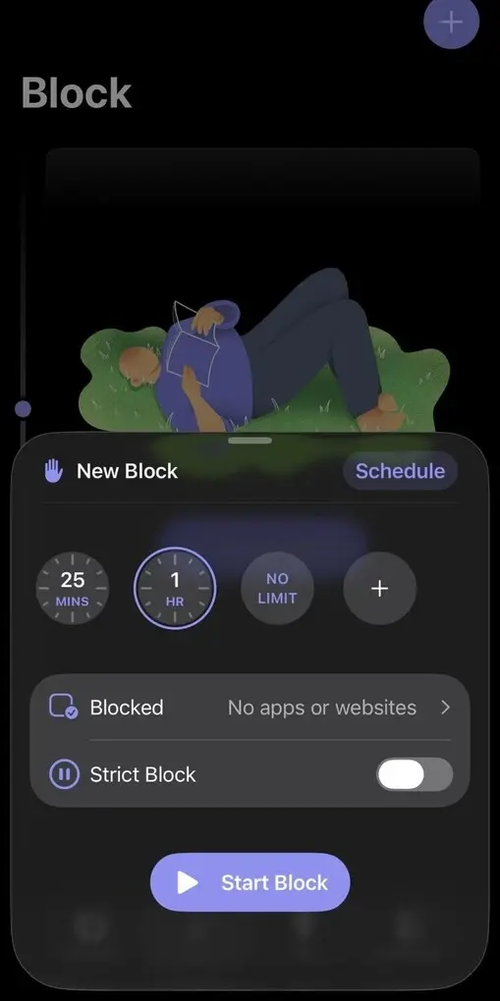
Mindful Interventions: one sec’s core feature is the intervention that appears when you try to open a configured app. The default breathing intervention gives you a short pause before you can continue, making it harder to open a distracting app automatically and giving you a moment to reconsider.
Custom Interventions: Pro users can choose from several intervention types, including breathing exercises and other interactive options. This gives you more control over the type of friction you want to add to distracting apps.
Re-Intervention: If you start scrolling and spend longer than intended in an app, Re-Intervention can interrupt you again after a set period. You then need to go through another intervention before continuing, which can help prevent a quick check from turning into a much longer session.
Block Sessions: one sec also includes dedicated block sessions for times when you need stronger protection from distractions. You can create manual or scheduled blocks and configure which apps or websites should be restricted during them.
Time Tracking and Habit Awareness: one sec provides app-usage statistics and other features designed to make you more aware of your screen-time habits. However, its insights are primarily centered on app usage and distraction behavior rather than detailed deep-work performance or productivity analytics.
one sec Pricing
● Free plan available for one configured app
● Pro: €3.99/month or €14.99/year
● Lifetime: €99.99
one sec’s Strengths
● Uses friction to interrupt automatic app-opening habits
● Helps reduce mindless scrolling
● Offers multiple intervention types
● Re-Intervention can interrupt extended scrolling sessions
● Includes dedicated blocking sessions for stronger distraction protection
● Available across iPhone, iPad, and Mac
Short wrap-up: one sec is a good choice for people who repeatedly open distracting apps without consciously deciding to and want a habit-focused way to become more intentional with their screen time.
one sec’s Limitations
● Less focused on structured focus sessions than apps such as Floviu
● Its screen-time approach may not appeal to users looking for detailed productivity analytics
● Many advanced features require Pro
● Its interventions may feel unnecessary if you already have strong control over your app usage
Short wrap-up: one sec is best suited to people who want to interrupt automatic app-opening and scrolling habits. If you primarily want Pomodoro sessions, deep-work tracking, or a broader focus system, another app may be a better fit.
Freedom
Best App Blocker for iPhone for Cross-Device Distraction Blocking
Freedom is a focus and distraction-blocking app that lets you block distracting apps, websites, or even the entire internet during focus sessions. Its biggest advantage is that you can sync blocking sessions across your iPhone, iPad, and computer, making it useful if you regularly switch between devices.
Best for:
Blocking distractions across multiple devices
Not ideal if:
You want personalized focus insights or a softer approach to distraction management
Biggest advantage:
Syncs distraction blocking across multiple devices
Main tradeoff:
Its stronger blocking approach can feel restrictive compared with apps focused more on habit awareness
How Freedom’s Features Performed During My Testing
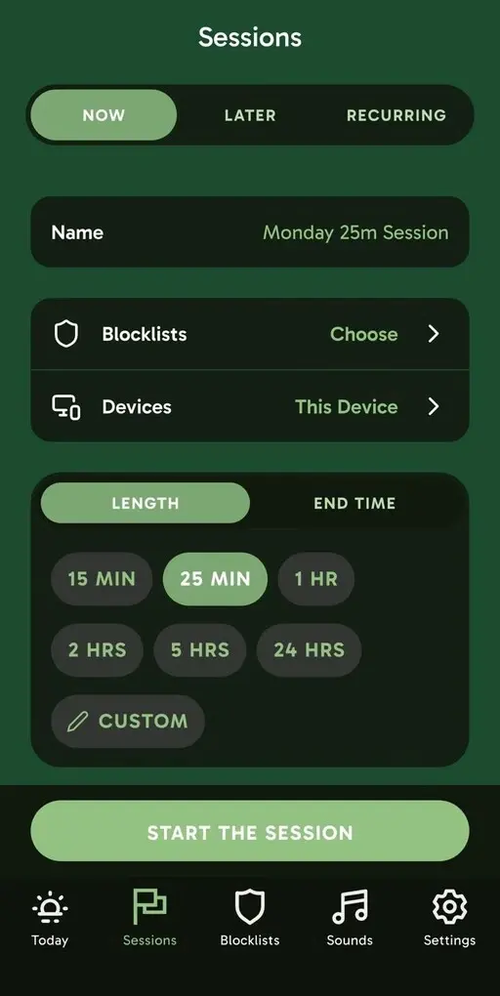
App and Website Blocking: Freedom lets you create custom blocklists for distracting apps and websites, or block the entire internet during a session. On iPhone, app blocking works through Apple’s Screen Time controls, while website blocking uses a separate system.
Focus Sessions: You can start a blocking session immediately or schedule one for later. Premium also supports recurring sessions, which can help you turn distraction-free time into a regular routine rather than something you have to set up manually each time.
Locked Mode: When you need stronger protection from distractions, Locked Mode prevents you from simply ending a session early. I found this useful for situations where I knew I was more likely to give in to distractions and needed a firmer boundary.
Cross-Device Sync: One of Freedom’s biggest advantages is its ability to sync sessions across iPhone, iPad, Mac, Windows, Android, and Chromebook. This is particularly useful if you tend to move between your phone and computer while working.
Focus Sounds: Freedom also includes ambient sounds such as office, café, and nature sounds. I see these as a useful addition rather than a core feature, especially if you like having background sound while working.
Freedom Pricing
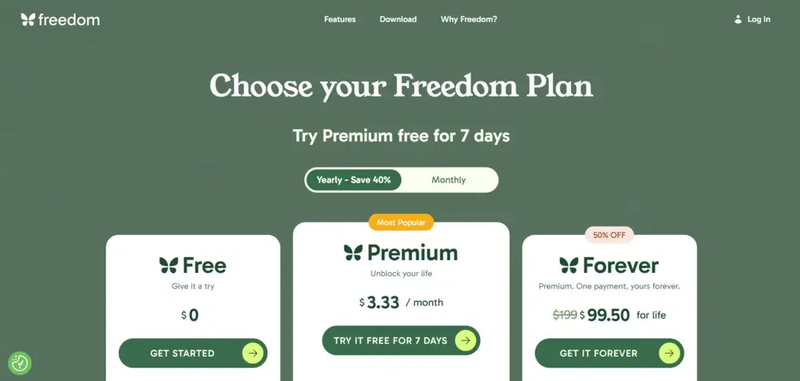
● Free plan available
● Premium: $3.33/month
● Freedom Forever: $99.50 one-time payment
Freedom’s Strengths
● Blocks distracting apps, websites, or the entire internet
● Syncs blocking sessions across multiple devices
● Supports flexible scheduling and recurring sessions
● Locked Mode provides stronger distraction protection
● Includes ambient focus sounds
● Free plan available
Short wrap-up: Freedom is ideal for people who want strong distraction blocking that follows them across their iPhone, computer, and other devices.
Freedom’s Limitations
● Strong blocking can feel restrictive
● Less focused on personalized focus insights or habit analysis
● Many advanced scheduling features require Premium
● May be more than you need if you only want a simple iPhone app blocker
Short wrap-up: Freedom is a strong choice if you want firm, cross-device distraction blocking. If you prefer a more habit-focused approach or want deeper insights into your focus patterns, another app may be a better fit.
Summary
I hope this article helps you find an app blocker that fits the way you use your iPhone. Try one of the options that best matches your habits, and see whether creating a few intentional boundaries can make it easier to protect your attention.
Frequently asked questions
What is the best free app blocker for iPhone?
The best free app blocker depends on how much friction you need. Apple Screen Time is built into iOS and lets you set app limits and Scheduled Downtime, while apps such as ScreenZen use delays to interrupt access to certain apps. For stronger restrictions, dedicated blockers can offer system-level blocking or scheduled sessions.
How can I set app limits for certain apps on iPhone?
You can set daily time limits for individual apps through the Settings app using Apple Screen Time. You can select specific apps or entire categories and restrict access after the limit is reached. However, the Ignore Limit button can make these limits easy to bypass, so they may not provide a real lock for everyone.
How do app blockers stop you from opening distracting apps?
App blockers use different levels of friction to restrict access to selected apps. Some add a delay of a few minutes or ask you to complete an exercise before opening an app, while strict blockers can enforce scheduled sessions or system-level blocking. Hardware solutions can add even more friction because they require a physical card or NFC device to unlock access.
Are app blockers easy to bypass on iPhone?
It depends on the app. Software blockers can sometimes be bypassed with options such as an Ignore Limit button or a single tap, while strict blockers are designed to make bypassing harder. Hardware-paired solutions, such as an NFC device or physical card, can provide an additional barrier when you want to avoid bypassing restrictions during vulnerable moments.
Can I use an app blocker for daily routines or parental controls?
Yes. App blockers can be used for daily routines, scheduled limits, and restricting access to certain apps. Apple's Screen Time also includes Downtime, time limits, and parental controls for a child's device. For more demanding restrictions, dedicated blockers can create scheduled sessions or restrict selected apps without relying entirely on iOS's built-in limits.

Safeguard Your Child Against Online Threat
Register Now Cancel Any Time
Available
on
Cancel Any Time
Available
on