

Published on Sep 02, 2025

Prasanta R
How do I buy social media accounts in Sebuda?
Buying social media today has many benefits that can reach businesses and individuals from zero to the top. Separate from the advantages it offers, trusting a social media marketplace to access the best and high-quality social media accounts based on your priorities and requirements is a significant decision that puts a huge responsibility on the marketplace to guarantee the security, advanced filters, and in-depth analysis.
Whether you are aiming to raise your brand awareness, reach your target audience, drive engagement, or want to know which content strategy best suits your preferred business, Sebuda can connect you with the right and personalized accounts to peacefully fulfill your marketing needs.
In this post, you will find how to buy social media accounts in Sebuda by considering a set of actionable steps and important tips to help you make a winning purchase decision.x

Why Choose Sebuda for Buying Social Media Accounts?
Choosing Sebuda to purchase your social media accounts is a smart move and viable option for new businesses to exist and drive engagement, for medium-sized businesses to grow steadily and shine.
When Subuda can provide access to a large variety of categorized social media accounts that are validated, efficient, reasonable price and it helps buyers save costs and resources, and easily find their right account.
Also, Sebuda specializes in offering useful and advanced tools and valuable features that enable buyers to exclusively evaluate and choose their social media accounts.
This approach is highly useful for those who want to take control over their account purchase by browsing through accounts and discovering which type of accounts are the best choice for them.
The biggest reason that motivates buyers to buy their social media accounts from Sebuda is the transparent pricing and market, and extra and accurate information for those who aim to improve their personal branding, generating revenue.
Which Types of social media accounts does Sebuda offer?
The main social media platforms that are available on Sebuda for escrow include:
- Instagram: buying Instagram accounts is a great opportunity for brands, influencers, and e-commerce businesses to expand their brand awareness and make money. The most important factors that you should look for are a high follower count, niche and relevant audiences, and noticeable engagement rates.
- YouTube: buying YouTube channels is a really viable and valuable option for those who want to monetize from this platform, with vast subscriber bases and a clear content strategy that already generates traffic and ad revenue.
- TikTok: because of TikTok’s viral potential, buyers often seek accounts with large, active followings in specific niches to quickly launch content or promote products.
- Telegram: buying a Telegram account is a good idea for community building, selling products/services, and broadcasting to large audiences. The basis of purchasing this account is looking for accounts with engaged members and large subscribers, especially if your goal is to make money online.
- X (Twitter): buying a Twitter account is recommended for individuals or businesses who aim to gain huge influence and credibility. High-follower accounts with active engagement are especially valuable.
Step-by-Step Guide: How to Buy an Account on Sebuda
When figuring out how to buy a social media account, the steps of the purchase should indicate how the marketplace is verified and trusted, because the steps and the provided data can create a successful purchase for you.
Buying social media accounts in Sebuda includes 8 important steps that each of which has a significant impact on choosing your right and best social media account.
- Sign Up for Sebuda
If you tend to buy a social media account, you have to sign up for Sebuda.com.
- Click on the Sign up yellow button at the top right of the website.
- You should enter your Email, Username, and Password and click on Sign up.
Note: Remember that you can sign in with your Google account.
- Choose a type of social media.
You should know which type of social media you need to purchase. From the main page, choose the social media platform such as Instagram, YouTube, TikTok, Telegram, and X.
- Use Filter options
Filters are the advanced options that help you access a limited range of social media accounts from the large number of accounts, to finally be able to choose the most compatible ones that align with your niche and goal.
- Min Price, Max Price: This filter lets you determine the price range of the social media account you are looking for.
- Min Follower, Max Follower: Using these two filters allows you to enter the minimum and maximum number of followers you prefer to have for your account.
- Gender (Men, Women): This important option helps you to specify your users' gender identity based on your business preferences.
- Category: This filter is the most important option that helps you specify the niche you are looking for.
- Top Country and Top City: Using this filter option helps you to determine which city and country are most important for you, according to your niche, business, or location and interests.
- Date Joined Before: This is the date the account was created.
- OG Email: an Original Email is the first email to which a social media account was registered and used for account recovery or verification.
- Analyze accounts information & insight.
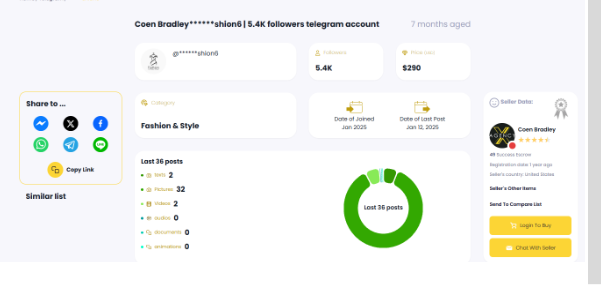
After setting the filter options, click the View option for each account that Sbuda lists for you. The account insight and its useful data help you to make the right decision and have a clear understanding of an account's performance and details.
- Compare different accounts
After browsing through the accounts and discovering the most suitable ones, you might be wondering which account is the best choice to fulfill your requirements and interests. This feature helps you to compare your selected accounts and give an overview of them beside each other.
- Followers: Shows the number of users who follow the account
- Price: Determines how much the social media account costs
- Category: indicated the business type of the account.
- Security: Indicates the security level of a social media account, divided into three types: Verified, OG-Email, and Non-verified accounts.
- Date of joining the account: Shows the account’s age.
- Date of the first post: It shows the exact date of the account’s first post.
- Date of the last post: This metric shows when the most recent post.
- All posts: This option shows the account’s total number of content, including videos, carousel posts, and reels.
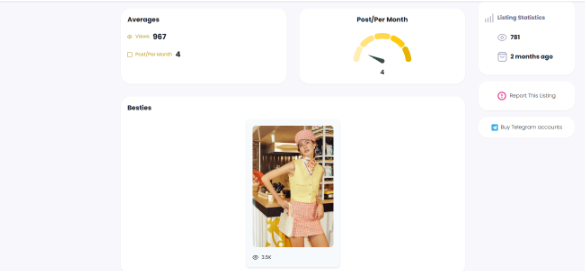
- Averages: it shows the average of engagements, including likes, comments, and published posts per month.
- Besties: this option shows the best posts that gain a great engagement rate, such as views, likes, and comments.
- Top 10 Hashtags: This metric shows the account's most engaged content.
- Top 10 mentions: This shows the top 10 tagging or mentioning of the account that could get seen.
- Age Range: It shows the age group of the account audience.
- Description: It says about the account overview and the necessary explanation to get more views and engagement.
- Insight pictures: the screenshots of the account's Insight.
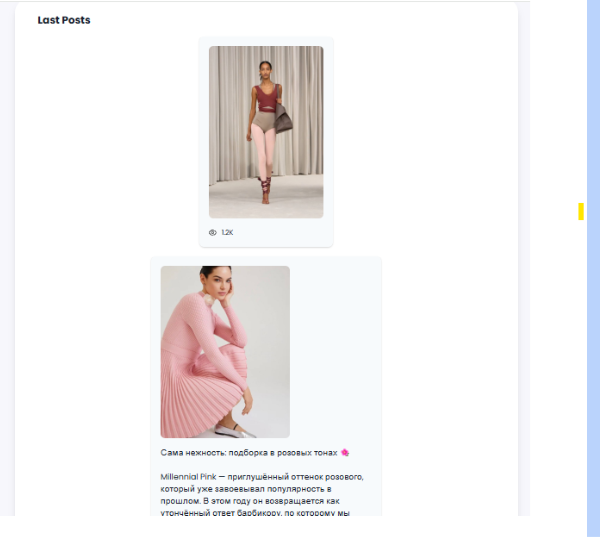
- Last Posts: This metric shows the previous 50 posts of the account.
6. Check sellers data
After the buyers review and analyze the targeted social media account, it is time to know more about the seller's background and authenticity.
- Success Escrow: The number of successful transactions a seller has ever made.
- Registration Date: The seller's date of registration on the Sebuda.
- Sellers’ other Items: This option lists the seller’s other social media accounts for sale, like Instagram, TikTok, YouTube, and X.
- Send to Compare List: If you need to compare the best three social media accounts at once, click send to compare list.
- Chat With Seller: Sebuda provides a secret chat system that helps buyers to ask their probable questions, discounts, your recommended price, or future account opportunities.
- Listing Statistics: This shows how many profile views this account gets. It can also indicate how important an Instagram account is. This option determines the buyer’s bargaining power.
- Buy with Escrow: if you agree to buy the account considering its insight, history, and price, you can click on this option to make a deal and buy the account.
7. Choose & purchase the account.
After account analysis and negotiation with the seller through the chat system, you can start the escrow.
- Click the Buy with Escrow button, and you will be redirected to the page to accept the buyer’s rule. (remember to read the rules competently)
- If you agree with the rule, check the checkbox and click on Start Escrow.
Note: You can offer a new price to the buyer before any negotiation by clicking on the offer option beside the price.
- The seller can accept your offer right away, or you can chat with the seller and negotiate with them to agree on a final price.
8. Secure Money Transfer
- In the Buyer Payment Step, you should choose how to pay (Tether, USDC, Bank).
- After paying for the site, Sabuda’s admin receives information from the seller.
- (OG Email and account username, and password) and check all the security issues.
- After decreasing the commission of seller, the buyer’s payment is sent to the seller.
- The buyer must log in to the seller’s email and social media account and check the 16 security tips within 24 hours. Also, the buyer can ask for the Sebuda admin to review and check all the security tips and steps.
Benefits of buying social media accounts in Sebuda
Sebuda offers several key benefits for marketers looking to buy a social media account to expand their reach and engagement. It provides a smart marketplace and lists different social media accounts to easily find your account, connect with a vast target audience, improve your brand awareness, and generate income. The platform also offers valuable analytics, enabling buyers to track every account's performance and make secure transactions.
Here's a more detailed look at the benefits:
- 7/24 fast support
- Free chat system
- No commission for buyers
- User-friendly UI /Ux
- Compare option
- Full analysis of social media accounts
Conclusion
As a business, if you don't have a social media account, you are losing a great opportunity to connect with your target audience to market your business and earn money. Buying your social media account from Sebuda Marketplace lets you make this wish true and reach your goal.
Buying a social media account instead of creating a new account from scratch is easier and more worthwhile by finding a trusted marketplace that offers the right tools and key analytics.

Safeguard Your Child Against Online Threat
Register Now Cancel Any Time
Available
on
Cancel Any Time
Available
on