
Published on Oct 01, 2026

Super Admin
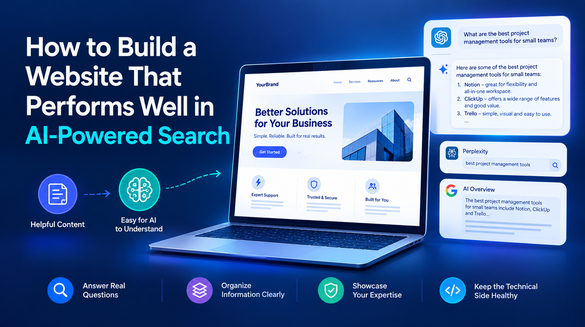
How to Build a Website That Performs Well in AI-Powered Search
Not long ago, getting found online meant earning a place on Google's first page.
Now, someone looking for a product might ask ChatGPT for recommendations, use Perplexity to compare providers, or rely on an AI Overview for a quick answer.
That shift is changing what website owners need to think about. Your pages still need solid SEO, but they also need information that an AI system can understand and use when answering someone's question.
A vague service page or an article padded with keywords gives both readers and search systems very little to work with.
The good news is that you do not need to rebuild everything around AI. Start with the things that make a website useful in the first place: answer real questions, organize information clearly, explain your expertise, and keep the technical side healthy.
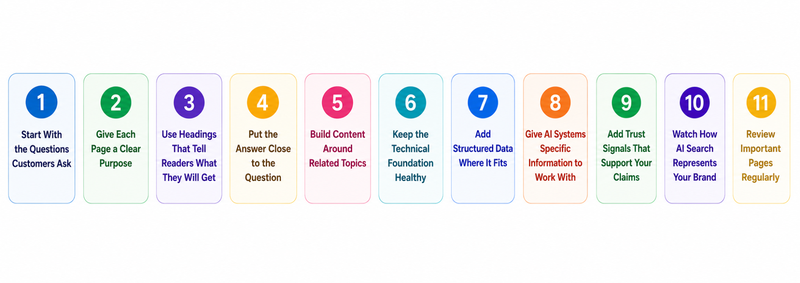
These 11 steps show where to begin.
11 Steps to Build a Website That Performs Well in AI-Powered Search
1. Start With the Questions Customers Ask
Keyword research can tell you what people type. Customer conversations can tell you why they type it.
Look through sales emails, support tickets, reviews, call notes, and site-search data. You will often find questions that never appear in a standard keyword report.
Your sales and support teams already hear many of these questions. Start there. Group the questions into useful categories:
- What does the product or service do?
- Who is it for?
- How does it compare with alternatives?
- What does it cost?
- What problems does it solve?
- What happens after someone signs up?
This gives your content team something more useful than a spreadsheet full of disconnected keywords.
Writing better content briefs with AI means defining the audience, intent, keywords, structure, tone, and goals before drafting. That makes the brief useful for a writer instead of turning it into another box to tick.
2. Give Each Page a Clear Purpose
A service page should help someone understand your service. A comparison page should make the differences between options easy to follow. A guide should solve the problem promised by its title.
That sounds obvious, but websites often mix several jobs in one page. A page about CRM software might spend half its space discussing company history before explaining what the software does.
Put the information people came for near the front of the page. If the main question is “How much does CRM software cost?”, do not make visitors hunt through three sections before reaching pricing.
3. Use Headings That Tell Readers What They Will Get
“Things to Consider” tells a reader almost nothing. “What to Check Before Migrating Your Website” gives them a reason to keep reading.
Write headings that describe the information underneath them. Use H2s for major topics and H3s when a section needs smaller divisions. Keep paragraphs focused instead of packing several unrelated ideas together.
A useful page might use a structure like this:
| Page element | Purpose |
|---|---|
| H1 | Identify the main topic |
| H2s | Divide the topic into major questions |
| H3s | Explain specific subtopics |
| Lists | Make several related points easier to scan |
| Tables | Compare options or information |
| Internal links | Lead readers to relevant resources |
When a website discusses decisions involving people, context becomes especially important. Confiscore's Recruitment Confidence Management uses feedback from people who have interacted with a candidate, including professors, former managers, mentors, and interviewers. That broader input gives recruiters more context than a single interaction can provide.
Website content benefits from the same thinking. When you make a claim, explain where it comes from, who it applies to, and why it matters to the reader. That extra context makes the page easier to understand and gives people something concrete to evaluate.
4. Put the Answer Close to the Question
Readers should not scroll through six paragraphs to find one sentence.
For example:
Can a website migration affect SEO? Yes. Poorly managed URL changes, redirects, indexing settings, and internal links can cause organic visibility problems.
The explanation comes afterward. That keeps the page useful for someone who needs a quick answer while still giving readers enough detail to understand the issue.
This writing style also gives AI search systems a clean passage to interpret. The answer remains visible while the surrounding explanation provides context.
An AEO platform like Similarweb helps teams see how that content performs inside AI search experiences. Similarweb's AEO tools include prompt tracking, AI brand visibility, citation analysis, sentiment analysis, and competitor comparisons. That can show which questions bring your brand into an AI answer, which sources receive citations, and where competitors appear instead.
For example, a company might rank for “CRM software” but disappear when someone asks which CRM works best for a small consulting firm. That difference gives the marketing team a specific question to investigate.
5. Build Content Around Related Topics
One article cannot establish much depth around a competitive subject.
Suppose a managed IT company wants to become known for cybersecurity. One broad cybersecurity article will not cover everything customers need. The site could also publish ransomware guides, industry-specific security advice, comparison pages, service explanations, and troubleshooting resources.
Link those pages when the connection makes sense. Someone reading about ransomware should be able to reach the relevant protection service without returning to the homepage and starting over.
6. Keep the Technical Foundation Strong
Technical SEO may not be the most exciting part of building a website, but small problems can create large headaches.
Start with the basics:
- Keep important pages crawlable and indexable.
- Fix broken internal links.
- Remove unnecessary redirect chains.
- Use descriptive URLs.
- Keep navigation simple.
- Make pages work properly on mobile devices.
- Compress oversized images.
- Use HTTPS.
- Check indexing issues in Google Search Console.
When optimizing website design during development for SEO, ensure that you take care of structure, navigation, responsiveness, and other SEO considerations that belong in the development process.
7. Add Structured Data Where It Fits
The key is to keep the markup accurate. Do not add schema because a particular type sounds useful. The information should describe something visitors can find on the page.
For example, an event page might list the date, location, and organizer. Relevant structured data can help search engines understand those details. If the page does not contain a particular piece of information, adding it only to the markup does not make the page more useful.
8. Give AI Systems Specific Information to Work With
Too many promotional claims leave readers with little substance to judge.
“We are the industry's leading platform” sounds impressive, but it does not tell someone what the platform does or why it might suit them.
Explain the product, audience, problem, process, limitations, and alternatives where relevant. Add first-hand examples when your team has them. Cite research when you use it. Include documentation, customer evidence, expert input, or original observations where appropriate.
Those details give your website a point of view. They also make a page more useful to someone who has never heard of your business.
9. Add Trust Signals That Support Your Claims
Getting someone onto a page is only half the job. They still need a reason to believe what they are reading.
Make authorship clear. Show relevant experience. Explain who runs the company. Cite sources for research and keep claims specific enough for readers to assess.
Readers should also be able to tell who stands behind the information. Add author bios, credentials, company information, reviews, case studies, and other signals that establish credibility. Keep these details easy to find, especially on pages that influence important decisions.
Trust comes from knowing who is making the claim and why they are qualified to make it.
10. Watch How AI Search Represents Your Brand
Traditional SEO(Search Engine Optimization) reports answer questions about rankings, traffic, and clicks. AI-powered search adds another layer: what does an AI system say when someone asks about your category?
This information can uncover gaps that a traditional ranking report may miss.
Look at the questions where competitors appear. Check what their cited pages explain well, then improve your own content where it leaves important questions unanswered.
You may discover that a competitor is not ranking dramatically higher in traditional search but still appears more often in AI-generated answers. Use that difference to identify where your content falls short.
11. Review Important Pages Regularly
Publishing a page is not the end of the story. Products change, competitors add new information, and customers start asking different questions.
Set a review cycle for your most important pages. Look for outdated claims, weak examples, unanswered questions, missing sources, and sections that no longer match search intent.
A monthly review should include:
- Pages gaining or losing organic traffic.
- Important queries bringing visitors to your site.
- New questions from sales and support teams.
- Topics competitors cover more thoroughly.
- AI prompts where your brand does not appear.
- Pages that need updated examples or sources.
You do not need to predict every change coming to search. Keep checking what people ask, how your pages perform, and where your website leaves questions unanswered. For questions that need an instant reply, adding a chatbot can help, and looking at a few chat widget options first makes the choice easier.
Build a Website That Gives Search Something Useful
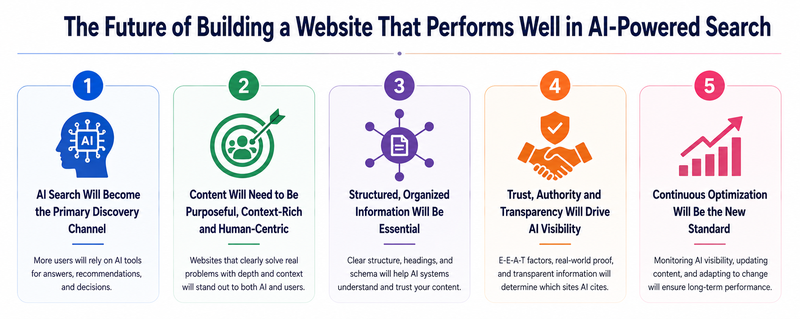
AI-powered search does not make the fundamentals of a good website irrelevant. But it makes clear information even more important.
Start with questions customers already ask. Give pages a clear purpose. Write useful headings, answer questions directly, connect related resources, and approach AI website development with the same focus on clarity and usability. Fix technical problems before they become larger issues.
Then add evidence and first-hand knowledge so visitors have something solid to trust.
Keep measuring what happens after publication. If competitors appear for questions your business should answer, look closely at what their pages do better. Maybe they explain the topic more clearly. Maybe they provide stronger evidence. Or maybe they simply answer the question sooner.
Those are problems you can and should fix.
Search will keep changing, but a website built around useful information has a better chance of adapting with it.

Safeguard Your Child Against Online Threat
Register Now Cancel Any Time
Available
on
Cancel Any Time
Available
on