
Published on Oct 23, 2026

Prasanta R
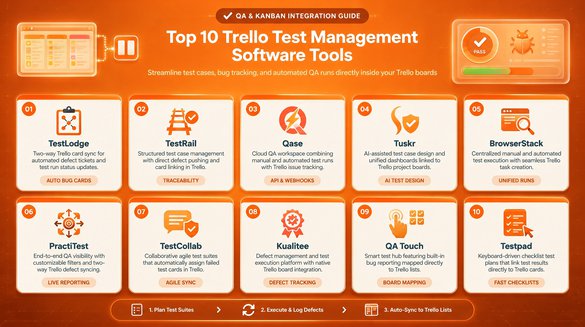
Top 10 Trello Test Management Software Tools
Trello organizes work with boards, lists, and cards. Many QA teams use it to assign testing tasks, log bugs, and follow progress. That setup works well early on. As test suites grow, teams need a place for test cases, execution results, regression runs, and defect history.
Dedicated test management software fills that gap. Developers keep their Trello boards, and testers get a structured QA workspace. This guide compares 10 tools on features, integrations, usability, and team fit.
Integration depth varies. Some tools have a native Trello connection. Others use a Power-Up, Zapier, or an API. Each entry names the route, based on vendor documentation, Trello's integration directory, and Zapier listings.
Top 10 Trello Test Management Software Tools
1. Kualitee: Best for Connecting Trello With Dedicated QA Workflows
Kualitee is a test management platform built to sit beside project boards. According to Kualitee's documentation, its Trello integration works in both directions.
- Test case creation, execution, and result tracking
- Defect management with pre-configured Trello field mapping
- Synced cards and defects, including edits, labels, and assignees
Setup needs admin access, a Trello App Key, and a token. Field mapping is basic and fixed.
Teams that want to connect their project management and testing workflows can explore Kualitee’s integration with Trello to coordinate project cards and QA defects across both platforms.
2. TestRail: Best for Structured Test Case Management
TestRail is a dedicated platform for managing test cases. Its support center lists several Trello options.
- Central test case repository with runs and plans
- Reference plugin that looks up Trello issues from cases, runs, and milestones
- Defect plugin that creates Trello issues and sends attachments
Trello's URL structure blocks direct card links through defect and reference URLs. TestRail suits teams that accept a plugin setup.
3. Qase: Best for Modern QA Workflows
Qase offers a modern interface for test management. Its documentation describes a Trello app that installs from the Apps page.
- Test cases, runs, and plans with reporting
- Links from cases, runs, and defects to Trello cards
- Trello card creation when a test result fails
Each test run links to one Trello issue. Qase fits teams that want a supported app.
4. PractiTest: Best for QA Visibility and Traceability
PractiTest focuses on visibility and traceability across testing. No native Trello connector appeared in the sources reviewed.
- Requirements, tests, runs, and issues connected in one place
- Detailed reporting and coverage views
- Zapier templates for Trello cards from new issues and requirements from open cards
The Zapier route needs a third-party automation account. PractiTest fits teams that want detailed reporting and accept that extra layer.
5. Testmo: Best for Combining Manual and Automated Testing
Testmo brings manual and automated testing into one platform.
- Manual test cases and runs
- Automated test result reporting
- Trello Power-Up that adds links to cards and boards
Trello's directory entry describes links only, with no two-way sync. Testmo suits teams that mix testing approaches.
6. Testiny: Best for Teams Seeking a Lightweight Test Management Platform
Testiny is a lightweight tool for teams that want less setup.
- Test cases, plans, and runs
- Team collaboration
- Trello Power-Up that links cards to test cases and results
Small teams can trial the Power-Up on one board before a wider rollout.
7. TestLink: Best for Teams Exploring Open-Source Test Management
TestLink is an open-source option for budget-conscious teams.
- Test case organization, plans, and execution
- Requirements coverage and result tracking
- XML-RPC API for custom connections
Testsigma's overview lists Jira, Mantis, Bugzilla, and Redmine support. No Trello connector turned up, so a link needs custom work. Open source also has costs, since TestLink runs on PHP and MySQL and your team handles hosting, setup, and upkeep.
8. TestLodge: Best for Straightforward Test Planning
TestLodge keeps test planning simple, and its website lists a Trello integration.
- Test plans, cases, and runs
- Automatic Trello card when a test fails
- Links to existing cards, with a comment each time the test reruns
The integration works with free and paid Trello accounts.
9. TestMonitor: Best for Coordinating Test Projects
TestMonitor coordinates test projects from planning through reporting.
- Test cases, runs, and results
- Issue tracking
- Progress reporting
Its website says it connects to Trello through Zapier, and a blog post shows a Trello task created for each new issue. Confirm the Zap covers your handoff.
10. Tuskr: Best for Teams Comparing Test Management Alternatives
Tuskr covers core test management for teams comparing options.
- Test case management and planning
- Test execution and reporting
- API and webhooks, according to GetApp user reviews
No Trello connector showed up in public listings, so plan custom work if the connection matters.
Comparison Table: Which Test Management Tool Should Trello Users Choose?
| Tool | Main Strength | Trello Integration Status | Best Suited For |
| Kualitee | Dedicated QA and defect synchronization | Native two-way (Kualitee docs) | Teams linking Trello with structured testing |
| TestRail | Test case management and execution | Native defect and reference plugins (TestRail docs) | Teams needing organized test cases |
| Qase | Modern test management workflows | Native Trello app (Qase docs) | Teams seeking a modern QA interface |
| PractiTest | QA visibility and traceability | Via Zapier; no native connector found | Teams requiring detailed reporting |
| Testmo | Manual and automated testing | Power-Up for linking (Trello directory) | Teams combining testing approaches |
| Testiny | Lightweight test management | Power-Up for linking (Trello directory) | Teams prioritizing simplicity |
| TestLink | Open-source test management | None found; XML-RPC API | Technical teams with engineering time |
| TestLodge | Test planning and execution | Native integration (TestLodge site) | Teams wanting simple test management |
| TestMonitor | Test project coordination | Via Zapier (TestMonitor site) | Teams managing test projects |
| Tuskr | Test case management and reporting | None found; API and webhooks | Teams comparing QA platforms |
How to Choose the Right Test Management Tool for Your Trello Workflow
The right tool depends on team size, testing complexity, technical skill, and budget.
1. Small QA Teams
Small teams need quick setup, fair pricing, and little upkeep. A native app or Power-Up cuts setup work.
2. Agile Development Teams
Agile teams link project tasks to QA work and need clear defect ownership. Two-way sync keeps sprint testing visible to everyone.
3. Automation-Heavy Teams
These teams need automated result reporting, API access, and CI/CD fit. An API is also the fallback when no connector exists.
4. Enterprise QA Teams
Enterprise teams need requirements traceability, detailed reporting, permissions, and support for many projects and releases.
A feature list alone does not decide the choice. Confirm that the integration route supports your workflow.
Conclusion
Test management software should complement Trello and add what boards lack. Compare candidates on test case management, execution tracking, defect handling, reporting, integration fit, usability, and total cost.
The integration route matters as much as the feature list, because a native app, a Power-Up, and a Zapier workflow behave differently day to day. Shortlist two or three tools and run a real project through each connection.
Teams that keep Trello as their project hub can look at dedicated QA platforms that connect testing and defect tracking to existing boards. The right pick depends on your workflow and the integration you verify.

Safeguard Your Child Against Online Threat
Register Now Cancel Any Time
Available
on
Cancel Any Time
Available
on